Typing Practice: The Complete Guide to Getting Faster (2026)
Type "typing practice" into any search engine and you'll get a thousand pages of generic advice — "practice daily," "use all your fingers," "don't look at the keyboard" — none of it wrong, none of it enough to actually move your number. The real question isn't whether to practice. It's what to practice, in what order, and how to tell it's working.
This page is the map. It won't repeat every detail of touch typing, accuracy drills, or exam prep — we've written full guides for each of those, and we'll point you to the right one. What it will do is show you the whole territory at once, so you know exactly where you are and what to read next.
Quick Answer
Effective typing practice has three ingredients, in this order: correct technique (touch typing, proper finger placement), accuracy before speed (a typo-free 20 WPM beats a sloppy 35), and short, frequent sessions (15 minutes daily beats two hours on Sunday). Skip any one of the three and progress stalls — usually around 30–40 WPM, regardless of how many hours get put in.
Key Takeaways - Technique comes before speed. Learning home row and correct finger placement first is what makes every later minute of practice actually count. - Accuracy is the real bottleneck for almost everyone. Chasing WPM directly usually backfires — see how to improve typing accuracy. - 15 minutes daily beats 2 hours once a week, because motor skills consolidate during sleep between sessions, not during the session itself. - Your practice plan should match your actual goal — a 3rd grader, a job applicant, and a government-exam candidate need different targets and different guides, all linked below. - Progress is invisible without measurement. A short daily test is the only way to know practice is actually working, not just happening.
What "Typing Practice" Actually Means
Typing practice is often treated as one activity — "type stuff, get faster" — but it's really three separate skills stacked on top of each other, and most people's practice fails because they're training the wrong layer.
- Motor skill. Which finger presses which key, and how reliably it does so without looking. This is pure muscle memory, built through repetition, and it's the foundation everything else sits on.
- Pattern recognition. Fast typists aren't pressing letters one at a time — they're recognizing whole word-shapes and typing them as a single motor sequence, the same way a fluent reader doesn't sound out each letter. This layer builds automatically once the motor skill is solid, but only if you're practicing real words and sentences, not isolated keys forever.
- Sustained focus. Typing a sentence quickly is easy; typing three paragraphs at your top speed without your accuracy or attention collapsing is a different, later skill — closer to an endurance sport than a party trick.
Most stalled typists are missing layer 1 and trying to force layer 2 by typing faster. It doesn't work, which is why the next section exists.
The Three Rules Behind Every Good Session
Every effective typing routine, regardless of age or goal, follows the same three rules. Get these right and the specific drills matter far less than people assume.
Rule 1: Technique before speed. Touch typing — eyes on the screen, each finger owning a fixed set of keys — is the multiplier on everything else. A hunt-and-peck typist practicing for a year typically plateaus around 30–40 WPM; a touch typist with the same year of practice routinely passes 70–80 WPM, because their hands aren't spending half their effort searching for keys.
Rule 2: Accuracy before speed. This is the one almost everyone gets backward. Typing fast and sloppy doesn't train speed — it trains fast mistakes, which then have to be unlearned later at real cost. The fix is almost boringly simple: slow down until you're consistently above 95% accurate, and let speed rise on its own from there. The full mechanics are in How to Improve Typing Accuracy.
Rule 3: Frequency beats duration. A 15-minute daily habit outperforms a 2-hour weekly session by a wide margin, because motor learning consolidates during sleep between sessions — the practice doesn't fully "land" until you've slept on it. Twelve short sessions across two weeks teach your hands more than one four-hour marathon ever will.
Step 1: Learn the Fundamentals
If you can't yet type without looking at the keyboard, start here before anything else — every minute spent on speed drills before this is a minute of muscle memory built on the wrong foundation. Starting from absolute zero? Typing Practice for Beginners: Your First 30 Days walks the whole month day by day.
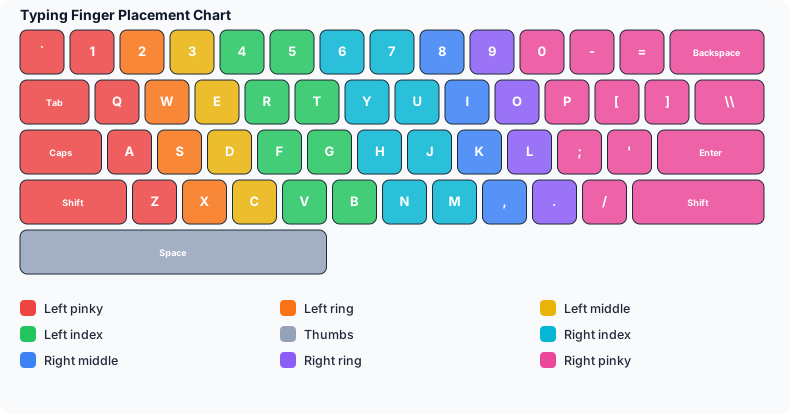
- Home Row Keys Explained — the eight keys your fingers return to after every stroke, and the true starting point of touch typing.
- Typing Finger Placement: The Complete Guide — the full chart of which finger owns which key, plus the five mistakes that quietly cap most self-taught typists.
- What Is Touch Typing? — the complete beginner's guide to the whole system, if you want the full picture in one place before drilling in.
Budget one to two focused weeks here. It will feel slower than your old habits at first — that dip is normal and temporary, and it's the price of removing your speed ceiling rather than just raising it slightly.
Step 2: Build Speed Without Wrecking Accuracy
Once technique is in place, speed and accuracy grow together — but they're still two different skills with two different guides, because the mistakes that cap each one are different.
- How to Type Faster: 12 Habits That Actually Add WPM — the specific habits that move your number, beyond "practice more."
- How to Improve Typing Accuracy — the drills and mindset shifts that fix a high error rate, which is the single most common thing capping intermediate typists.
- What Is a Good Typing Speed? — average WPM benchmarks by age and profession, so you know what "good" means for you specifically, not a generic number from the internet.
Step 3: Follow a Routine, Not Random Practice
Opening a typing site and mashing out a random paragraph for ten minutes is better than nothing, but it's the least efficient version of practice there is. A simple weekly structure gets far more out of the same amount of time:
| Day | Focus | Time |
|---|---|---|
| Mon | Weak-key drill (whatever letters/keys you personally miss most) | 10 min |
| Tue | Plain-prose passage, accuracy-focused, no timer pressure | 15 min |
| Wed | Timed test — record WPM and accuracy as your baseline for the week | 10 min |
| Thu | Punctuation and capitals (the most commonly neglected skill) | 15 min |
| Fri | Race or game mode — this is the fun, low-pressure reinforcement day | 15 min |
| Sat/Sun | Rest, or one light session if you're enjoying it | Optional |
Repeat weekly, swapping in harder material as your baseline number climbs. Most people notice a genuine jump — the moment typing starts to feel automatic rather than effortful — somewhere between week 2 and week 4.
Typing Practice by Who You Are
The three rules above apply to everyone, but what you practice and how much speed you actually need depends heavily on your situation. Find yourself below.
Students and kids. Age changes what's realistic — a 3rd grader chasing an adult's WPM target is a recipe for frustration, not progress. Start with Typing Speed by Grade Level for age-appropriate benchmarks, then make the practice itself fun with the best typing games for students. Learning to code? Typing Practice for Programmers covers why your prose WPM doesn't predict your code WPM, and what to drill instead.
Teachers and classrooms. Running practice for 25–30 students at once is a different problem than practicing yourself. Typing Games for the Classroom has ready-made lesson structures, Typing Classes for Schools covers live WPM monitoring for a whole class, and Typing Practice with No Student Accounts explains the code-based login system that avoids the student-email problem entirely.
Job seekers and government exam candidates. If a specific test or threshold is the goal, generic practice wastes time you don't have. Typing Speed Test for Jobs explains what employers actually check, while SSC CGL & CHSL Typing Test and Punjab Government Typing Test Preparation cover the specific speed and accuracy thresholds, fonts, and formats each exam demands.
Punjabi typists. Typing in Gurmukhi has its own layout decisions and its own muscle memory to build. Start from zero with Punjabi Typing: Complete Beginner's Guide, or go straight to the layout decision with Raavi vs AnmolLipi, Explained Properly if you already know the basics.
Make It a Habit: Games, Races, and Tools
The single biggest predictor of long-term progress isn't technique — it's whether practice still feels worth doing in week six. Drills build the skill; games and races are what keep you showing up.
- Ghost Racing: How Racing Your Best Run Makes You Faster — racing your own past self, rather than a stranger, turns out to be the most motivating opponent there is.
- Live Typing Races — race real players every hour if solo drilling gets stale.
- Best Nitro Type Alternatives — free, unblocked options if you're practicing from a school or office network.
- Monkeytype vs TypingBIRDS — a fair comparison if you're choosing which site to actually practice on.
The Keyboard Layout Question
Almost everyone asks eventually: should I switch off QWERTY? Short answer, most of the time, no. Dvorak vs QWERTY: Is Switching Worth It? covers the real tradeoffs, but the practical summary is that alternative layouts are marginally faster for experts and cost weeks of relearning — and every school, office, and government exam in the US, UK, Canada, India, and Australia tests QWERTY. Master standard placement first; revisit the layout question only if you're already fast and curious.
Common Practice Mistakes
These show up across every age group and goal, and they're responsible for the majority of "I've practiced for months and I'm still stuck" stories.
- Chasing WPM directly. Speed is a byproduct of correct technique and accuracy, not something you can will into existence by trying to type faster. Chasing it directly usually just adds errors.
- Practicing tired or distracted. Motor learning needs focus, not just time. Ten focused minutes beat thirty half-attentive ones.
- Never measuring. Practicing without a number to compare against feels like effort but has no direction. A short test at the end of each session is what turns practice into visible progress.
- Skipping punctuation and numbers. Plenty of typists hit a good WPM on plain lowercase prose and then stall the moment real writing — capitals, commas, numbers — enters the mix. Practice with realistic text, not just word lists.
- Switching methods every week. Trying a new layout, a new finger system, or a new app every few days prevents any single habit from consolidating. Pick a method and stay with it for at least a month before judging it.
How to Know Your Practice Is Working
Progress in typing is genuinely hard to feel in the moment — a session that felt identical to last week's can represent real improvement your hands haven't noticed yet. The only reliable signal is a consistent, short measurement taken the same way each time: same test length, same time of day if possible, WPM and accuracy both recorded.
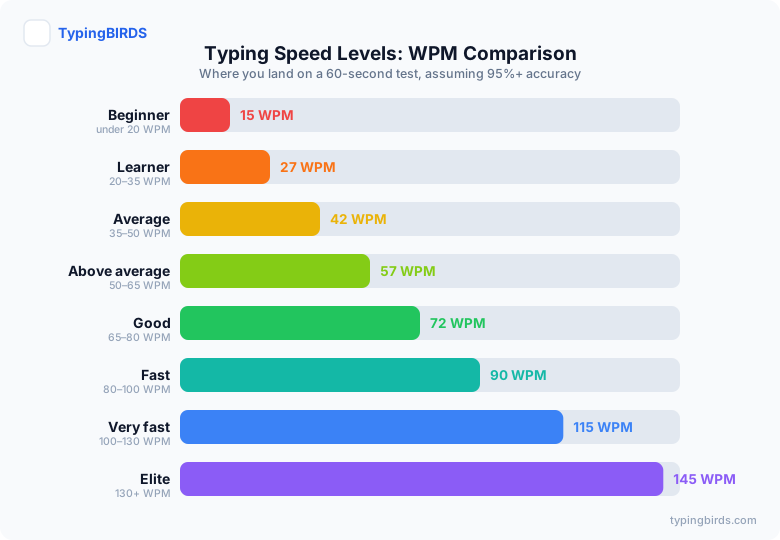
A rough, honest expectation: with the three-rules approach and a weekly routine like the one above, most beginners see their first clearly visible jump within 2–3 weeks, and a full plateau-to-plateau improvement (say, 20 WPM to 35 WPM) typically takes 2–4 months of consistent short daily sessions. Progress isn't linear — expect a fast first month, a slower middle stretch, and another visible jump once touch typing becomes fully automatic.
Conclusion
Good typing practice isn't a mystery and it isn't about grinding more hours than everyone else. It's technique first, accuracy before speed, short sessions on a regular rhythm, and a routine that matches what you're actually practicing for — whether that's a classroom, a job application, a government exam, or just wanting your hands to keep up with your thoughts.
Start with the fundamentals if you haven't already, pick the guide above that matches your situation, and give it three honest weeks before judging the results. Then start a lesson or take a quick baseline test and let the number do the rest of the convincing.
Frequently Asked Questions
What is the best way to practice typing?
Learn correct touch-typing technique first, prioritize accuracy over speed while it develops, and practice in short daily sessions rather than long infrequent ones. That combination — technique, accuracy, frequency — outperforms any specific drill or app on its own.
How long should I practice typing each day?
15-20 minutes daily is the sweet spot for most people. Motor skills consolidate during sleep between sessions, so daily short practice beats occasional long sessions, even at the same total weekly time.
How long does it take to get good at typing?
Most beginners feel real improvement within 2-3 weeks of consistent short daily practice, and reach a comfortable, fluent speed (roughly 40-50 WPM) within 2-4 months. Continued gains beyond that come more slowly and depend on how much you type day to day outside of practice.
Is it better to practice with words, sentences, or paragraphs?
Start with short drills targeting specific weak keys, move to full sentences once individual keys feel automatic, and finish with paragraphs to build the sustained focus real typing requires. Skipping straight to paragraphs before the fundamentals are solid just repeats bad habits at scale.
Should I focus on speed or accuracy first?
Accuracy first, always. Practicing fast while making frequent errors trains your hands to make fast mistakes, which then have to be unlearned. Stay at whatever speed keeps you above roughly 95% accuracy, and your speed will rise naturally as the correct patterns solidify.
Can adults still significantly improve their typing speed?
Yes. Motor learning slows slightly with age but doesn't stop, and most self-taught adult typists have picked up inefficiencies (poor finger placement, looking at the keyboard) that leave real speed on the table. Correcting technique alone often adds 15-20 WPM regardless of age.
Do typing games actually help, or are they just a distraction?
They help, specifically with the habit-forming part of practice. Games and races don't replace deliberate drills, but they solve the much harder problem of getting someone to show up and practice consistently for weeks, which matters more than any single session's content.
What typing speed should I be aiming for?
It depends on your goal: see the grade-by-grade targets in our grade-level guide if you're a student, the thresholds in our jobs and government-exam guides if you're testing for work, or general age/profession benchmarks in "What Is a Good Typing Speed" for an everyday target.
Do I need special software to practice typing?
No. A free browser-based typing site is enough for effective practice — structured lessons for fundamentals, timed tests to measure progress, and games or races to keep it consistent. No installation or account is required to get started.
Why did my typing speed stop improving?
Plateaus almost always trace back to one of a few causes: incorrect finger placement never fully corrected, accuracy quietly slipping as speed became the only focus, or practicing the same easy material repeatedly instead of material that challenges your actual weak points. Reviewing finger placement and adding punctuation-heavy or unfamiliar text usually breaks a stall.
Still have questions? The fastest answer is your own number.
Start Practicing Free →Keep reading
Monkeytype vs TypingBIRDS: Which Typing Site Fits You in 2026?
An honest, feature-by-feature comparison of Monkeytype and TypingBIRDS — test styles, racing, classrooms, Punjabi typing, and which site fits your goal.
Typing BasicsWhat Is a Good Typing Speed? Average WPM by Age and Profession
What is the average WPM for typing? See average typing speed in WPM by age and profession, what counts as good, and how to test and improve your own score.
Typing BasicsWhat Is Touch Typing? The Complete Beginner's Guide
What is touch typing and why does it matter? Learn finger placement, home row keys, posture, common mistakes, and a step-by-step plan to learn it fast.
Typing BasicsTyping Practice for Beginners: Your First 30 Days
A day-by-day 30-day typing practice plan for absolute beginners — what to do each week, how long to practice, and how to tell it is actually working.
Typing BasicsFree Typing Speed Test - Check Your WPM and Accuracy Instantly
Take a free typing speed test and instantly check your WPM and accuracy. No signup, works in any browser - see how your typing speed compares.
For TeachersTyping Speed by Grade Level: Realistic WPM Targets from Grade 2 to 12
Realistic typing speed benchmarks by grade — WPM and accuracy targets from grade 2 to 12, plus how much practice time each grade needs.