Typing Classes for Schools: Live WPM Monitoring, No Student Emails
Most classroom typing software was built for individual learners and then awkwardly retrofitted for schools — student accounts, email addresses, parental consent forms, IT tickets, and a "teacher dashboard" locked behind a paid tier.
TypingBIRDS Typing Classes was designed the other way around: for computer labs, shared devices, and real school days. A school admin sets everything up once — teachers, classes, students — and from then on, teachers just open their dashboard and watch every student's WPM and accuracy update live. Students never need an email address or a password.
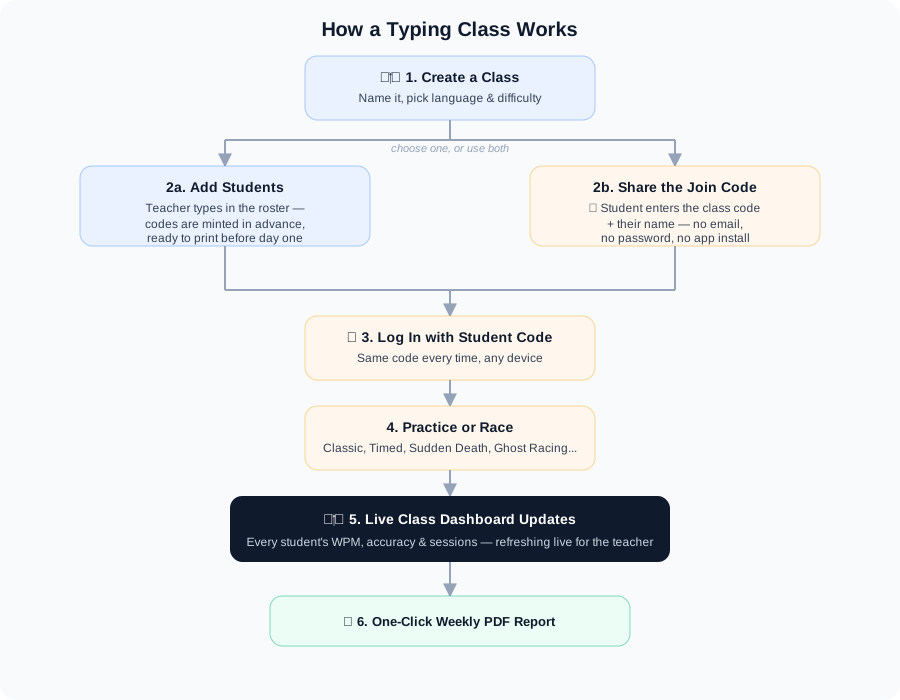
Here's exactly how it works, what's in the teacher dashboard, and how schools are using it as a full typing program for schools — not just a single game.
Is This a Typing Program or Just a Game?
Both, deliberately. Underneath the racing and the games, TypingBIRDS is typing software for schools built around a real curriculum arc: home row first, then top and bottom row, then full passages, with WPM and accuracy tracked at every step so a teacher can see actual progress, not just a leaderboard. A class's difficulty and game mode are locked by the teacher who sets it up, so a "typing program" for a 3rd-grade class and one for a 7th-grade class look genuinely different, even though it's the same software underneath.
How Setup Actually Works: Admin, Teacher, Student
TypingBIRDS uses three roles, and understanding them up front saves confusion later: an Admin account can't also be a Teacher account (each Google login is one or the other) — most schools use their tech coordinator or office account for Admin, and teachers sign in with their own Google account.
- The school admin sets up the school. Whoever's registering the school signs in with Google at Admin, registers the school once, then adds each teacher (by their Google email or with a generated login code), creates classes, adds students to them, and assigns each class to a teacher. A built-in setup checklist walks through all of this step by step.
- The teacher creates a game for their assigned class. Once a class is assigned, the teacher opens Classes → Create Game and picks the mode students will actually play in — Practice (lessons & drills), Classic, Timed 60s, Sudden Death, or Word Rain — plus language and difficulty. Students already added by the admin join automatically, keeping their existing login codes.
- Students log in with their code and start typing. No email, no password, no app install — just the class code (or their personal student code, if the admin pre-added them) on any computer.
Student Codes: Logins for Kids Without Email
Here's a problem every computer-lab teacher knows: young students don't have email addresses, and asking a seven-year-old to retype their name exactly the same way every day is fragile — "Simran K" today and "simran kaur" tomorrow become two different students on your roster.
TypingBIRDS solves this with student codes. Every student gets a short permanent code (6 digits + 1 letter, like 482913K) the moment the admin adds them to a class. From then on, that code is their login: they can type it on any computer in the lab — or at home — and pick up exactly where they left off, with their history intact. A teacher can print a codes sheet for the whole class from the roster in one click.
What the Teacher Dashboard Gives You
- Live roster — every student's average WPM, accuracy, best WPM, and total sessions, auto-refreshing while the lesson runs.
- Per-student lesson progress & printable report — click into any student's Practice history to see every lesson's stars, WPM, and accuracy, and print a take-home report with the school and teacher's name on it.
- Weekly PDF report — a ranked, printable summary of the week: who practiced, how many sessions, average and best WPM (Paid plans; included free during the trial).
- Printable student codes sheet — generate and print every student's permanent login code for the whole class in one click.
- Student certificates — as students hit speed and accuracy milestones, they earn printable certificates, which double as a tangible motivator younger students respond well to.
- Class leaderboard feel — students can see where they rank, and friendly competition reliably drives more improvement than solo drills.
- Simple moderation — fix a typo in a student's name or remove a student, without losing anyone else's history.
- Anti-cheat built in — runs below 70% accuracy never count, so key-mashing can't inflate anyone's stats or the leaderboard.
One honest limit to plan around: a class holds up to 35 students. For a bigger cohort, create one class per section — most teachers do that anyway, since it keeps rosters and reports readable.
Free Trial and Pricing
Every school starts with a 30-day free trial: up to 200 students, 10 classes, 5 teachers, and 1 co-admin, with Practice/Race/Word Rain, lesson progress, certificates, and Live Races all included. After 30 days, student login codes pause until the school upgrades — admin and teacher accounts stay fully accessible the whole time, so nothing is lost and there's no rush.
Paid plans are priced by student capacity, starting at ₹599/quarter (~$7) for up to 250 students, with unlimited classes and teachers on every paid tier. Weekly PDF Reports and CSV Export are paid-plan features.
Why Schools Choose It
- 🖥️ No installation. Runs entirely in the browser — school Chromebooks, Windows PCs, Macs, tablets, and phones. No deployment, no IT ticket.
- 🔑 No student accounts. One code and a first name, and they're in. No email, no password, no parental-consent paperwork — ideal for primary schools and shared lab machines.
- 🎮 All game modes count. Practice lessons & drills, Classic races, Timed and Sudden Death modes, and Word Rain — a teacher picks which one a class plays in.
- 🌐 Punjabi typing. A dedicated Punjabi mode using the AnmolLipi font — one of the few school typing tools with real regional-language practice, tracked in the same class dashboard.
- 🆓 Generous free trial. 30 days, 200 students, 10 classes, 5 teachers — enough to run a real pilot before any billing conversation.
How Schools Use It
Computer lab lessons. Students log in with their codes, practice for 20 minutes in the mode the teacher configured, and every session lands on the roster automatically.
Friday competitions. Turn one lesson a week into a class typing race — Live Races run on a fixed schedule with reserved seats, so a whole class can race together at the same moment.
Homework practice. Because student codes work from any device, practice at home counts toward the class too. The weekly report then shows exactly who did it.
Punjabi typing periods. Schools teaching Punjabi run the same lessons in Punjabi mode — same roster, same reports, same leaderboard.
TypingBIRDS vs Other School Typing Software
| Feature | TypingBIRDS | Nitro Type | Typing.com |
|---|---|---|---|
| Students join without any account | ✔ | ✘ | ✘ |
| Permanent student code login (no email) | ✔ | ✘ | ✘ |
| Per-student WPM/accuracy roster | ✔ | ✘ | ~ paid |
| Printable weekly class report | ✔ (paid/trial) | ✘ | ~ limited |
| Ghost racing mode | ✔ | ✔ | ✘ |
| Punjabi / regional language typing | ✔ | ✘ | ✘ |
| Works on Chromebooks | ✔ | ✔ | ✔ |
| Free trial before any billing | ✔ 30 days, 200 students | ~ ads/tiers | ~ limited |
Typing.com's structured curriculum is genuinely good if your school can use accounts and doesn't mind the paid tier for full monitoring; Nitro Type is fun but is frequently blocked by school filters as a gaming site. TypingBIRDS' advantage is friction: from "never heard of it" to "whole class typing with live monitoring" in one setup session, with a real 30-day trial before any payment is needed.
Frequently Asked Questions
How do I set up typing classes for my school?
A school admin signs in with Google at /admin, registers the school, then adds teachers and creates classes for them. Each teacher then opens Classes → Create Game on their assigned class to pick a mode (Practice, Classic, Timed, Sudden Death, or Word Rain). The whole setup takes a few minutes — no IT department needed, no software to install.
Do students need to create accounts to join a typing class?
No. Once the admin adds a student to a class, they get a short permanent student code (like 482913K) — no email, no password, no app install. They log in with that code on any computer to start typing and pick up exactly where they left off.
Can I see my students’ WPM live during a typing lesson?
Yes. The class roster shows each student’s average WPM, accuracy, best WPM, and session count, refreshing automatically while you watch — you can monitor the entire class from your desk without walking the room.
How many students can join one typing class?
Up to 35 students per class. For larger cohorts, create one class per section — it also keeps rosters and weekly reports easier to read. The free trial covers up to 200 students total across the whole school.
Does TypingBIRDS work on school Chromebooks?
Yes. It runs entirely in the browser with no installation, so it works on Chromebooks, Windows PCs, Macs, tablets, and phones — no software deployment or IT ticket required.
Is it suitable for student data privacy?
Students join with just a first name (and an optional roll number) — no email address, no password, and no account. That minimal footprint is what makes it practical for primary schools and shared lab computers.
Can students practice Punjabi typing in class?
Yes. TypingBIRDS includes a dedicated Punjabi typing mode using the AnmolLipi font, and a teacher can set a class up to practice in Punjabi — sessions are tracked in the same class dashboard and weekly report.
Is there a free trial, and what happens after it ends?
Every school gets a 30-day free trial covering up to 200 students, 10 classes, and 5 teachers, with lesson progress, certificates, and Live Races included. After 30 days, student login codes pause until the school upgrades to a paid plan — admin and teacher accounts stay fully accessible the whole time, and nothing is lost while deciding.
Still have questions? The fastest answer is your own number.
Create a Free Class →Keep reading
Typing Speed by Grade Level: Realistic WPM Targets from Grade 2 to 12
Realistic typing speed benchmarks by grade — WPM and accuracy targets from grade 2 to 12, plus how much practice time each grade needs.
For TeachersClassroom Typing Practice with No Student Accounts or Emails
A typing practice tool for classrooms where students join with just a name and a class code — no student emails, no accounts, no passwords to reset. Free 30-day trial for teachers.
For TeachersTyping Games for the Classroom: A Practical Guide for Teachers
Typing games and keyboard games for the classroom. Game formats that teach real skills, a weekly lesson structure, and classroom tracking tools with a free 30-day trial.
For TeachersKeyboarding Curriculum for Schools: A Free, Ready-to-Use Framework
A ready-to-use keyboarding curriculum for schools - grade-by-grade targets, a weekly lesson structure, and free tools to run it, with no budget required.
For TeachersRun a School Typing Championship: Class Qualifiers to a Live Grand Final
How a TypingBIRDS Championship works — four rounds from class qualifiers to a synchronized live Grand Final, and why it beats a single one-off typing test.
Typing BasicsMonkeytype vs TypingBIRDS: Which Typing Site Fits You in 2026?
An honest, feature-by-feature comparison of Monkeytype and TypingBIRDS — test styles, racing, classrooms, Punjabi typing, and which site fits your goal.