Dvorak vs QWERTY: Is Switching Keyboard Layouts Worth It?
The argument that QWERTY is badly designed and Dvorak is objectively superior has been going on for nearly 90 years. It comes up in every productivity forum, every typing subreddit, every developer Slack. Most of the claims repeat the same myths. Here is an evidence-based look at what the data actually shows.
Why QWERTY Looks Like a Bad Design
QWERTY was developed in the 1870s for mechanical typewriters. The most common origin story — that keys were arranged to slow typists down so mechanical keys would not jam — is largely a myth. The real reason was a combination of sales demos, telegraph operator feedback, and patent history. But the result is the same: QWERTY puts common English letters across three rows, forcing a lot of finger travel that a purpose-designed layout could eliminate.
By one common analysis, a QWERTY typist's fingers travel about 16 miles per day of sustained typing. The same text on Dvorak requires roughly 1 mile.
💡 Finger travel distance is the most commonly cited argument for Dvorak. The number is real. Whether it translates to speed or comfort improvements is the actual question — and the answer is more complicated.
What Is the Dvorak Layout?
August Dvorak (pronounced duh-VOR-ak) designed his Simplified Keyboard in 1936 with an explicit goal: maximize typing efficiency by placing the most common English letters on the home row and alternating between hands.
The Dvorak home row is AOEUIDHTNS — covering roughly 70% of all English text without leaving the middle row. Compare that to QWERTY's home row ASDFGHJKL;, which covers only about 32% of English text.
Other principles of Dvorak design:
- Right hand handles most common letters (English is right-hand dominant)
- Common letter combinations alternate hands for speed
- Infrequent letters sit on the bottom row, which is hardest to reach
- Vowels all sit on the left home row
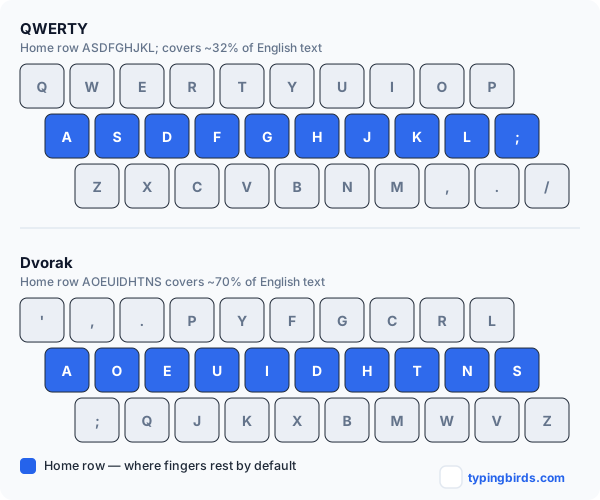
The Competing Claim: Colemak and Others
Dvorak is not the only QWERTY alternative. Others worth knowing:
- Colemak (2006) — keeps most QWERTY positions, only moves 17 keys. More popular than Dvorak among new alternative-layout adopters in 2026. Shares QWERTY shortcuts (Z, X, C, V stay in place).
- Workman — designed specifically to reduce lateral finger movement that Colemak still requires.
- AZERTY / QWERTZ — regional variants of QWERTY used in France and Germany; not significantly more efficient, just different.
QWERTY — Pros
- Universal — works on every device
- Keyboard shortcuts designed around it (Ctrl+Z, C, V, X)
- No relearning cost
- All typing tests are in QWERTY
- World record holders use it
Dvorak — Pros
- Less finger travel for English text
- More home-row typing
- Anecdotally reduces strain for some users
- Built into every major OS
- Strong community of advocates
What the Research Actually Shows
This is where the Dvorak argument gets complicated. The studies most often cited by Dvorak advocates were conducted by August Dvorak himself — a significant conflict of interest. The most rigorous independent study, conducted for the US General Services Administration in the 1950s, found no meaningful speed or efficiency advantage for Dvorak over QWERTY when controlling for training time.
Modern research has been similarly mixed:
- Studies comparing trained Dvorak and QWERTY typists show minimal average speed differences
- Some Dvorak typists report reduced fatigue and wrist discomfort — but this is hard to separate from the fact that they also retrained their technique when switching layouts
- No Dvorak typist holds a QWERTY world speed record — all competitive typing records are set on QWERTY
- The fastest individual typists in the world, those above 200 WPM, use QWERTY
💡 The confounding factor in almost every "Dvorak is better" study: when someone switches layouts, they also relearn proper finger technique. The gains may come from better technique, not the layout itself.
The Real Cost of Switching
This is what Dvorak advocates underplay. Switching layouts has concrete, measurable costs:
- 1–3 months to return to your pre-switch typing speed — during which you are significantly slower
- Every shared computer, colleague's machine, and public keyboard is now disorienting
- Keyboard shortcuts (Ctrl+Z, Ctrl+V, Ctrl+C) move — trained muscle memory is broken
- Remote desktop and virtual machines sometimes ignore software layout settings
- Vim and other tools designed around QWERTY become significantly harder
- Phone typing remains QWERTY — your brain now runs two layouts simultaneously
Who Should Actually Switch?
Switching to Dvorak or Colemak makes sense in a narrow set of circumstances:
- You are learning to type for the first time and have no QWERTY muscle memory to lose
- You have an existing repetitive strain injury that a physical therapist has specifically linked to QWERTY's finger travel patterns
- You type exclusively on one personal machine and rarely use shared computers
- You are a programmer interested in Colemak specifically, which preserves Vim key positions better than Dvorak
If none of those apply — if you are a competent QWERTY typist looking to go from 60 WPM to 90 WPM — switching layouts is almost certainly not the answer. Improving technique, accuracy, and consistency on QWERTY will get you there faster, with less disruption. Ghost Racing, Sudden Death, and Daily Challenge build real speed on the layout you already know, and most users gain 15–25 WPM within 30 days of regular practice.
The Verdict
Bottom line: Dvorak is a thoughtfully designed layout with genuine ergonomic logic. But the practical evidence that it produces faster typists is weak, and the transition cost is real and substantial. Most people who switch do not end up typing faster than they would have if they had simply practiced QWERTY with better technique for the same amount of time. If you are learning from scratch or have a documented RSI problem, Colemak is the more pragmatic alternative layout choice. For everyone else: invest that energy in improving your QWERTY technique — the ceiling on QWERTY is far higher than most people ever reach (how to type faster).
Colemak vs Dvorak: Which Is Better If You Do Switch?
If you have decided to switch, Colemak has practical advantages over Dvorak in 2026:
- Only 17 key changes from QWERTY — muscle memory partially transfers
- Z, X, C, V stay in the same positions — undo/cut/copy/paste shortcuts intact
- Larger active community with more learning resources
- Designed more recently with modern typing patterns in mind
Dvorak remains the more famous and widely built-in layout, but Colemak is the more practical switch for most people in 2026.
Ready to see where you actually stand on the layout you already know? Take a free WPM test in Practice mode on TypingBIRDS.
Frequently Asked Questions
Is Dvorak actually faster than QWERTY?
Not meaningfully, according to the most rigorous independent research. Studies controlling for training time show minimal speed differences between trained Dvorak and QWERTY typists, and no Dvorak typist holds a QWERTY world speed record.
How long does it take to learn Dvorak?
Most people take 1-3 months of dedicated practice to return to their pre-switch typing speed on Dvorak. During that window you are significantly slower than you were on QWERTY.
Is Colemak better than Dvorak?
For most people who decide to switch, yes. Colemak only moves 17 keys from QWERTY, keeps Z, X, C, V in place so shortcuts still work, and has a larger, more modern support community than Dvorak.
Does Dvorak help with wrist pain or RSI?
Some Dvorak typists report less fatigue, but it is hard to separate the layout itself from the fact that switching also forces a technique reset. If a physical therapist has specifically linked your RSI to QWERTY finger travel, switching can be worth considering.
Should a beginner learn Dvorak or QWERTY first?
QWERTY, for almost everyone — it is universal across every device, keyboard shortcut, and typing test. Dvorak only makes sense for a true beginner with zero existing muscle memory to protect.
Why do keyboard shortcuts break on Dvorak?
Shortcuts like Ctrl+Z, Ctrl+X, Ctrl+C, and Ctrl+V were positioned for QWERTY's physical key layout. On Dvorak those letters move to different physical keys, so trained shortcut muscle memory has to be relearned too.
What is the fastest way to increase WPM without switching layouts?
Focused practice on your existing QWERTY technique — accuracy first, then speed — consistently outperforms layout switching. Ghost Racing and Sudden Death modes on TypingBIRDS are built for exactly this, with most regular users gaining 15-25 WPM in 30 days.
Still have questions? The fastest answer is your own number.
Race Your Own Best Time →Keep reading
How to Type Faster: 12 Habits That Actually Add WPM
Learn how to type faster with proven technique fixes, daily drills, and practice modes. A realistic plan to go from 40 to 80+ WPM without bad habits.
Improve Your TypingGhost Racing: How Racing Your Best Run Makes You a Faster Typist
A typing speed test that races you against your own fastest run in real time, so you can spot where you slow down and beat your best WPM score. Free on TypingBIRDS.
Improve Your TypingLive Typing Races: Race Real Players Every 30 Minutes
TypingBIRDS runs scheduled live typing races — a new race every 30 min, up to 10 players, in English and Punjabi. Reserve a seat, race at the bell.
Improve Your TypingTyping Finger Placement: The Complete Guide (With Chart)
Learn correct typing finger placement with a full keyboard finger placement chart, step-by-step setup, common mistakes, and drills you can practice free today.
Improve Your TypingHome Row Keys Explained: Your First Touch Typing Lesson
What are the home row keys and why do they matter? Learn ASDF JKL; the right way with step-by-step lessons, drills, and a beginner practice plan.
Improve Your TypingHow to Improve Typing Accuracy: 12 Proven Tips and Exercises
Struggling with typos? Learn how to improve typing accuracy with proven exercises, an error-type diagnosis table, and a 14-day plan that works.