How to Improve Typing Accuracy: 12 Proven Tips and Exercises
Here's a number that surprises almost everyone: at 92% accuracy — which sounds pretty good — you're making a mistake roughly every twelve keystrokes. In a 60-second typing test at 40 WPM, that's about sixteen errors. Sixteen backspaces, sixteen re-types, sixteen tiny interruptions to your rhythm.
Now the part most people get backwards: those errors aren't just costing you correctness. They're the main thing capping your speed. Every mistake triggers a stop–delete–retype cycle that costs two to five keystrokes of time, breaks your flow, and pulls your attention off the text. Fix accuracy and speed rises on its own; chase speed while ignoring accuracy and you'll plateau forever, no matter how hard you push.
This guide is a complete accuracy training program: how accuracy actually works, how to diagnose your specific mistakes, twelve proven tips and exercises, a 14-day improvement plan, and answers to the questions every improving typist eventually asks.
What Typing Accuracy Really Measures
Typing accuracy is the percentage of keystrokes you type correctly. Most typing tests calculate it as:
Accuracy = (correct keystrokes ÷ total keystrokes) × 100
A few reference points to know where you stand:
| Accuracy | What It Means in Practice |
|---|---|
| Below 90% | Errors dominate your typing; speed gains are nearly impossible until this improves |
| 90–94% | Functional but leaky — roughly 1 error every 10–16 keystrokes interrupts your flow |
| 95–97% | Solid everyday accuracy; most typing tests for jobs expect this range |
| 98%+ | Professional level — errors are rare enough that flow is essentially unbroken |
Two details worth understanding:
- Corrected errors still cost you. Some tests only count errors you leave in the final text, but the mistakes you backspaced away already took their toll in time and rhythm. Serious accuracy training pays attention to raw accuracy — every wrong keystroke, corrected or not.
- Real typing tests weight accuracy heavily. Government and clerical typing exams in the US, UK, Canada, Australia — and elsewhere — typically fail candidates below a threshold (often 92–95%) regardless of speed. A 60 WPM candidate at 89% accuracy fails; a 38 WPM candidate at 96% passes. If a test is in your future, accuracy is the score to protect.
Why You Make Typing Mistakes: The Four Error Types
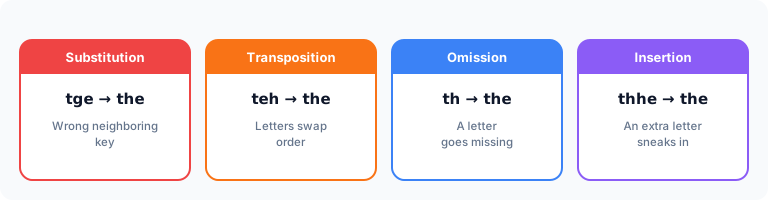
"Be more careful" is useless advice because different mistakes have different causes. Nearly all typing errors fall into four types — and each has its own fix:
| Error Type | Example | Root Cause | Primary Fix |
|---|---|---|---|
| Substitution (wrong key) | tge for the | Finger reached to a neighboring key — usually a placement or drift problem | Re-anchor technique; drill the specific confused pair |
| Transposition (swapped order) | teh for the | Hands out of sync — one hand fires before the other; a rhythm problem | Slow down; type to an even beat |
| Omission (missing letter) | th for the | A keystroke too light to register, or the mind racing ahead of the fingers | Deliberate full keystrokes; match speed to skill |
| Insertion (extra letter) | thhe for the | Bounce, double-tap, or an accidental brush of an adjacent key | Lighter touch; finger curvature check |
Diagnose yourself: take three one-minute typing tests, and instead of looking at the score, look at the mistakes. Write down every error and label its type. Most people discover 60–70% of their errors are one type, often involving the same few keys — which turns "I make lots of typos" into a small, specific, trainable problem like "my right ring finger substitutes O for I."
You'll also usually find your errors cluster on particular fingers (ring and pinky are the usual suspects) or particular transitions (same-finger sequences like ed, un, ce — where one finger must hit two keys in a row). This diagnosis is the foundation everything below builds on.
12 Proven Ways to Increase Typing Accuracy
1. Slow down to your "clean speed"
The single highest-impact change. Your clean speed is the fastest pace at which you can type with 98%+ accuracy — for most people, it's 20–30% slower than they usually type. Practicing at clean speed feels frustratingly slow, but it's the only pace at which you're rehearsing correct movements. Practice above it and you're literally training your errors. Speed built on clean movements sticks; speed forced over sloppy movements collapses under pressure.
2. Fix your finger placement first
A large share of substitution errors aren't carelessness — they're structural. If your index finger poaches keys that belong to weaker fingers, it arrives at those keys from inconsistent angles and misses. Correct typing finger placement gives every key exactly one finger and one approach path, which makes accurate landing dramatically easier. If you've never learned the formal system, that's your first fix.
3. Re-anchor on the home row constantly
Mid-paragraph errors often come from drift: your hands slowly migrate a few millimeters off base, and suddenly every reach is slightly miscalibrated. The home row with its F and J bumps is your recalibration tool — make a habit of confirming the bumps under your index fingers at every pause, and your reaches stay true.
4. Type to a steady rhythm
Transposition errors (teh, fro) happen when your hands race unevenly — easy letter pairs fire fast, hard ones lag, and keystrokes land out of order. Practicing to an even beat (a metronome at 60–80 beats per minute works, or just counting evenly in your head) forces your hands into sync. Rhythmic typists are almost never transposers, and rhythm is also what makes typing feel effortless.
5. Lighten your keystrokes
Insertion errors — doubled letters, brushed neighbors — usually come from heavy, tense hands. Try this: type a sentence as quietly as you physically can. You'll notice your fingers stay curved, strike with the tips, and stop bouncing. Light hands are accurate hands (and they last hours longer without fatigue).
6. Read one word ahead — not five
Omission errors often come from your eyes sprinting ahead of your hands: your mind is on word seven while your fingers mangle word three. Train your eyes to stay just one word ahead of your typing. It keeps your brain feeding your hands at exactly the rate they can execute.
7. Drill your personal problem keys
Generic practice improves everything a little; targeted practice improves your weakness a lot. Take your diagnosis from earlier and build tiny drills around your actual confusions. If you swap i and o: type oil boil coin void prior violin twenty times slowly. If ed trips you: edited needed decided deed. Five minutes of targeted drilling beats thirty minutes of random typing for fixing a specific error.
8. Stop backspacing during drills
Counterintuitive but powerful: during accuracy practice (not real work), forbid yourself the backspace key. When errors can't be erased, your brain treats them as events to prevent rather than mess to clean up — and your pre-keystroke care visibly increases within one session. TypingBIRDS has a Sudden Death mode built on exactly this principle: one mistake ends the run. It's brutal, slightly addictive, and one of the fastest accuracy sharpeners there is.
9. Practice with real, varied text
Typing the same test passage repeatedly inflates your score without improving your skill — you're memorizing, not typing. Real accuracy is measured on unseen text. Practice with varied material: articles, quotes, and passages with normal punctuation and capitalization, which is what real-world typing (and real typing tests) actually contains.
10. Check your setup and posture
Physical misalignment causes mechanical errors no amount of drilling fixes. Keyboard centered on your body, elbows near 90 degrees, wrists floating (not planted), screen at eye height so you're not craning down. Cold hands miss keys too — thirty seconds of finger stretches before a session genuinely helps.
11. Practice short and daily
Accuracy is a motor skill, and motor skills are built by frequent, focused repetition consolidated by sleep — not by marathon sessions. Fifteen focused minutes daily outperforms two hours on Saturday. Stop each session while your form is still good; practicing tired trains sloppiness.
12. Measure raw accuracy weekly, on fresh text
Track your progress with a weekly measurement under consistent conditions: same test length, fresh passage, honest raw accuracy. Improvement of one to two percentage points a week is excellent and compounds fast — 92% to 97% in about a month transforms how typing feels.
Simple Typing Exercises for Accuracy
Add these to your routine — each targets a different error mechanism:
- The 100% run: type one paragraph with zero errors allowed; any mistake and you restart the sentence. Builds pre-keystroke care. (Sudden Death mode automates this.)
- Metronome minutes: two minutes typing common words to a steady 60 BPM beat, one keystroke per beat. Builds rhythm, kills transpositions.
- Whisper typing: type as quietly as possible for two minutes. Builds the light touch that prevents insertions.
- Problem-pair ladders: your five worst letter pairs, each typed in five words, slowly, three rounds. Builds targeted precision.
- Eyes-closed home row: thirty seconds typing home-row words blind. Builds trust in touch over sight.
- One-minute honest test: finish with a single timed test on fresh text and record raw accuracy. Builds your progress record.
Total time: about 12–15 minutes. That's a complete daily accuracy workout.
A 14-Day Accuracy Improvement Plan
| Days | Focus | Success Marker |
|---|---|---|
| 1 | Diagnosis: 3 tests, label every error by type and key | Written list of your top 5 problem keys/pairs |
| 2–4 | Clean speed only + posture/placement fixes | 98% accuracy at slow speed |
| 5–7 | Add rhythm work + problem-pair ladders daily | Transpositions noticeably down |
| 8–10 | No-backspace drills + whisper typing | Clean runs of 2+ sentences |
| 11–12 | Gradually raise speed while holding 97%+ | Clean speed up 10–15% |
| 13 | Mixed real-text practice with punctuation | 96%+ on unseen text |
| 14 | Re-test: 3 fresh tests, compare with day 1 | Raw accuracy up 2–5 points |
The pattern matters more than the schedule: diagnose, slow down, fix mechanics, then — and only then — rebuild speed on the cleaner foundation.
Conclusion
Typing accuracy isn't a talent you're born with or a vague virtue you achieve by "being careful." It's a system: know your error types, slow to your clean speed, anchor your technique on correct finger placement and the home row, drill your specific weaknesses, and rebuild speed only on top of clean movement. Do that, and the improvement is close to inevitable — a couple of percentage points a week, which within a month turns typing from a chore full of interruptions into something that simply flows.
Start today with the diagnosis: three one-minute tests, label your errors, find your pattern.
TypingBIRDS makes the whole loop easy to run — free typing tests on fresh passages with raw WPM and accuracy after every run, a per-second speed graph that shows exactly where you stumble, practice drills for building fundamentals, and that wonderfully unforgiving Sudden Death mode for the days you want to sharpen accuracy the fast way. Pair this guide with the fundamentals in Typing Finger Placement and Home Row Keys, and give it fourteen honest days. Your accuracy graph will do the convincing.
Frequently Asked Questions
What is a good typing accuracy percentage?
Aim for 97% or higher for comfortable everyday typing. 95% is acceptable, below 92% means errors are actively holding back your speed, and 98%+ is where typing starts to feel genuinely effortless. Most employment typing tests expect at least 92–95%.
Should I focus on typing speed or accuracy first?
Accuracy, without question. Speed built on inaccurate technique collapses because every error costs multiple keystrokes to fix. Train at the fastest pace where you stay near 98% accurate, and speed will rise automatically as clean movements become automatic.
Why do I keep making the same typing mistakes?
Because typing errors are usually *trained habits*, not random slips — a finger has rehearsed a slightly wrong movement hundreds of times. Repeating the same mistake is actually good news: it's specific, which means a targeted drill on that exact key pair can retrain it in days.
Does looking at the keyboard reduce accuracy?
Yes, in a sneaky way: every glance down forces your eyes to re-find their place on screen, and errors spike in exactly those transitions. Touch typing — anchored on the home row, eyes on the screen — is more accurate as well as faster.
How long does it take to improve typing accuracy?
With 15 minutes of focused daily practice, most people gain 2–5 percentage points within two weeks. Going from ~92% to a stable 97%+ typically takes four to eight weeks. The early gains come fast because the biggest fixes (slowing to clean speed, correcting placement) work immediately.
Do typing tests count corrected errors?
It varies. Many casual tests only count errors left in the final text, while formal exams often count every faulty keystroke or cap the permissible error percentage. For training purposes, always pay attention to raw accuracy — corrected errors still cost time and rhythm even when they don't cost score.
Why is my accuracy worse on real tests than in practice?
Usually two reasons: practice on familiar text (which inflates your numbers) and test pressure (which pushes you above your clean speed). Practice on fresh, varied passages and rehearse under mild time pressure so test conditions feel normal.
What are the most common typing mistakes?
The big four: substitutions (wrong neighboring key, e.g. *tge*), transpositions (swapped letters, e.g. *teh*), omissions (missing letters), and insertions (doubled or extra letters). Most people are dominated by one type — identifying yours is the first step to fixing it.
Can typing exercises really fix accuracy, or is it just talent?
It's trainable, full stop. Accuracy is a motor skill like a golf swing or piano scale: diagnose the faulty movement, rehearse the correct one slowly, and repetition makes it automatic. "Naturally accurate" typists are simply people whose habits happened to form correctly.
Does keyboard type affect typing accuracy?
Somewhat. A keyboard with clear key travel and consistent feedback helps, and very shallow or mushy keyboards can increase insertion and omission errors. But technique dwarfs equipment — fix your clean speed, placement, and touch first, and you'll be accurate on any reasonable keyboard.
Still have questions? The fastest answer is your own number.
Race Your Own Best Time →Keep reading
How to Type Faster: 12 Habits That Actually Add WPM
Learn how to type faster with proven technique fixes, daily drills, and practice modes. A realistic plan to go from 40 to 80+ WPM without bad habits.
Improve Your TypingGhost Racing: How Racing Your Best Run Makes You a Faster Typist
A typing speed test that races you against your own fastest run in real time, so you can spot where you slow down and beat your best WPM score. Free on TypingBIRDS.
Improve Your TypingLive Typing Races: Race Real Players Every 30 Minutes
TypingBIRDS runs scheduled live typing races — a new race every 30 min, up to 10 players, in English and Punjabi. Reserve a seat, race at the bell.
Improve Your TypingDvorak vs QWERTY: Is Switching Keyboard Layouts Worth It?
The Dvorak vs QWERTY debate has lasted 90 years. Real evidence on who types faster, whether switching is worth the cost, and the truth about ergonomics.
Improve Your TypingTyping Finger Placement: The Complete Guide (With Chart)
Learn correct typing finger placement with a full keyboard finger placement chart, step-by-step setup, common mistakes, and drills you can practice free today.
Improve Your TypingHome Row Keys Explained: Your First Touch Typing Lesson
What are the home row keys and why do they matter? Learn ASDF JKL; the right way with step-by-step lessons, drills, and a beginner practice plan.