🎓 For Teachers
Typing Classes
That Run Themselves
Create a class in 30 seconds. Share one code. Watch every student's WPM update live on your screen — no accounts needed for students, no setup, no cost.
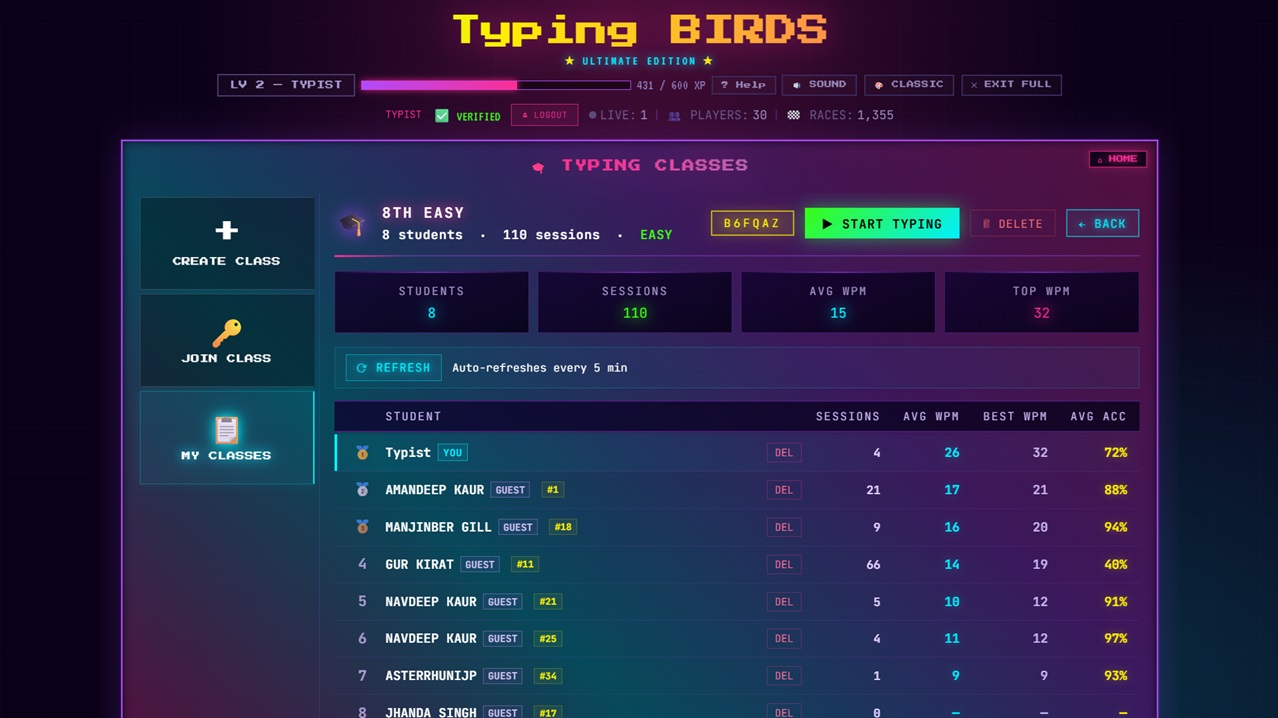
Live teacher dashboard — 8 students · 110 sessions · Avg WPM tracked in real time
Quick Start
Three Steps to Your First Class
CREATE
Sign in with Google on TypingBIRDS. Open Speed Club → Classes → Create Class. Name your class. Done in 30 seconds.
SHARE CODE
You get a short join code. Write it on the board or share the link. Students enter it on TypingBIRDS — no email, no signup, no install.
MONITOR LIVE
Your teacher dashboard shows every student's WPM, accuracy, and session count in real time as they practice.
Platform Features
Everything a Typing Teacher Needs
LIVE WPM DASHBOARD
See every student's current words per minute and accuracy updating in real time. Spot who needs help without walking the room.
CLASS LEADERBOARD
Students see where they rank within the class. Friendly competition drives faster improvement than solo practice alone.
INSTANT JOIN — NO ACCOUNTS
Students join with one code. No email address, no password, no parental consent form, no app download. They're typing in seconds.
ALL GAME MODES
Students access Normal mode, Ghost Racing, Sudden Death, Code mode, and Punjabi typing — their stats all count toward the class.
SESSION HISTORY
Track each student's best WPM and total sessions over time. See growth across weeks, not just today's single score.
COMPLETELY FREE
No subscription, no premium tier, no "basic plan" with limits. Full Typing Classes feature is free for every teacher.
How We Compare
TypingBIRDS vs Other Classroom Typing Tools
| Feature | TypingBIRDS | Nitro Type | Typing.com |
|---|---|---|---|
| Student join without signup | ✔ | ✘ | ✘ |
| Live WPM per student | ✔ | ✘ | ~ paid |
| Class leaderboard | ✔ | ✔ | ~ paid |
| Ghost racing mode | ✔ | ✔ | ✘ |
| Punjabi / regional language typing | ✔ | ✘ | ✘ |
| Completely free for teachers | ✔ | ✔ | ~ limited |
FAQ
Common Questions from Teachers
How do I create a typing class on TypingBIRDS?
Sign in with Google on TypingBIRDS, open Speed Club, select Classes, and tap Create Class. You get an instant join code to share with students. The whole process takes under a minute.
Do students need to create accounts?
No. Students open TypingBIRDS, click Play Now as a guest, and enter the join code you share. No email, no password, no app install required. Zero friction for students or parents.
Can I see my students' WPM live during class?
Yes. Your teacher dashboard shows each student's current WPM, accuracy percentage, and number of sessions — all updating in real time as they type.
How many students can join one class?
There is no hard cap. The class scales to accommodate a full classroom. Performance stays smooth as students are tracked through efficient live syncing.
Is TypingBIRDS suitable for school use?
Yes. Students can join as guests without providing any personal data. The platform contains no ads during active gameplay and no harmful content. It runs entirely in the browser on any device.
Can students practice Punjabi typing in class?
Yes. TypingBIRDS includes a dedicated Punjabi typing mode using the AnmolLipi font. Students switch between English and Punjabi from the main game screen, and their Punjabi sessions are tracked in the class dashboard.
Ready to start your first typing class?
Free. No credit card. Students can join in under 60 seconds.
🎓 OPEN TYPINGBIRDS — IT'S FREE